What is sales territory mapping software? The 9 best tools compared
Territory planning looks simple — until you try to balance real workloads across a wide geographic area. Sales reps end up covering uneven routes that create overlap or missed high-potential opportunities. Sales managers struggle to explain performance without a clear picture of what “good coverage” looks like.
If you support sales teams with data, territory mapping is how you make sense of scattered information. It helps you visualize where accounts and leads sit, so you can divide territories more fairly and spot gaps in coverage before they show up in the numbers.
In this article, we’ll compare sales territory mapping software for teams that want to turn sales data into actionable insights. These platforms make it easy for reps to know where to focus while building reliable, data-driven strategies.
Sales territory mapping software: What it is and benefits for sales teams
Sales territory mapping software turns sales data into a geographic view of your business. It helps teams plan coverage, prioritize client accounts, and make territory decisions that support revenue goals.
These platforms do more than just draw boundaries. You can also map where existing customers cluster to make in-person visits more efficient when sales reps travel — and visualize their performance through interactive maps.
Here are a few benefits:
- Improved territory design: Map territories based on real account density and travel constraints so workloads feel more manageable.
- More efficient in-person selling: Group customers and leads by location to reduce backtracking and increase face time on the road.
- Performance clarity by rep: Visualize results by rep and territory to quickly identify trends, outliers, and where resources need support.
- Smarter prioritization: Identify high-potential pockets, so reps spend time where revenue is most likely to improve.
- Better planning and reporting over time: Adjust territories without compromising consistent performance tracking.
9 best sales territory mapping software for sales reps
Here are the best sales territory mapping tools available for turning field data into actionable decisions.
Felt
Felt offers a fast, browser-based geographic information system (GIS) to map accounts, run spatial analysis, and share a single source of truth that guide weekly execution. For example, the sales performance dashboard lets you filter by sales trends, so you can see revenue by region and rep or order volume.
Main features
- Interactive maps and boundary analysis: Create interactive territory views and run geoprocessing and analysis workflows directly in your browser
- Filtering and spatial analysis: Quickly filter layers and tables using tools like “join” and “clip” to prioritize problem areas
- Collaboration and sharing: Share maps via links, set access permissions, and embed maps directly into internal sites
- Dashboards for KPI visibility: Add visuals like charts and graphs to analyze territory performance
- Integrations: Connect your Customer Relationship Management software directly to the map, and embed your map dashboard into tools like Tableau, Power BI, or Sharepoint.
Pricing
Felt offers two pricing plans:
Professional
- 7-day free trial
- Designed for individuals and teams building and sharing cloud-native GIS workflows
- Includes interactive maps, collaboration, AI-powered features, and browser-based GIS workflows
Enterprise
- Custom pricing
- Built for organizations that require enterprise security, governance, live cloud data connections, developer tooling, and dedicated support
Contact the Felt sales team for “Enterprise” pricing.
Google Maps
Google Maps provides a familiar interface for basic territory sketches and field navigation. With Google My Maps, you can draw territory shapes, import account lists from spreadsheets, and share a simple Google map that’s easy for stakeholders to understand. However, it’s not purpose-built for territory management, so you’ll have to consider more data-backed platforms for deeper spatial analysis.
Main features
- Custom maps: Draw shapes and points, search for specific locations, and style layers to outline basic territories
- Share and collaborate: Publish maps, co-edit with teams, and embed views for simple distribution
- Developer blocks: Use the Google Maps Platform APIs to power custom workflows
Pricing
- Google Maps or Google My Maps for free
- Google Maps Platform:
- Starter plan at $100/month
- Essentials plan at $275/month
- Pro plan at $1,200/month
BatchGeo
BatchGeo is a “spreadsheet-to-map” tool that helps you plot customers, leads, or locations and share a simple interactive map with your sales team. It’s great for quick territory visuals or lightweight field planning without a big setup. However, it doesn’t offer deeper territory management and caps route optimization to a fixed number of stops per plan.
Main features
- Spreadsheet mapping: Convert tabular data into plotted points for quick territory visuals
- Map styling and grouping: Group locations by color and columns to compare segments at a glance
- Heat maps: Reveal density patterns through data visualization across a region
- Exports and sharing: Export maps as PDFs or PNGs and secure them with password protection
Pricing
BatchGeo Pro plan at $99/month
Mapline
Like BatchGeo, Mapline is a spreadsheet-first mapping tool that converts CSV-based data into territory visuals. You can draw territories, color them by revenue or rep, and spot coverage gaps easily. However, packaging can feel modular based on workflows, and full pricing is typically quote-based.
Main features
- Territory mapping: Draw territories and use boundaries like ZIP codes or counties for overlays
- Auto-updating thematic maps: Color territories by volume and keep revenue-rep numbers updated as data changes
- Connectors and integrations: Pull data from sources like Google Sheets and Salesforce
Pricing
Free trials and custom quotes available
CARTO
CARTO is a cloud-based location intelligence platform. It runs geospatial analysis where your data already exists — typically in a cloud data warehouse — so you can build territory models at scale. It’s a strong fit for BI and data engineering teams, but it suits enterprises, so setup and pricing can feel heavy for teams that only need a lightweight mapping tool.
Main features
- Builder: Create interactive maps and dashboards directly from cloud-scale data
- Analytics Toolbox: Run spatial functions inside your cloud data warehouse
- Data Observatory: Access a catalog of publicly available and premium spatial datasets
Pricing
- Free trials and custom quotes available
Esri (ArcGIS)
Esri is a full ArcGIS platform that handles sales territory planning at scale for enterprises. It combines customer locations with demographic data, market potential, and performance data, giving you insights into high-prospect opportunities. That said, it might not suit teams looking for something lighter.
Main features
- ArcGIS Business Analyst: Supports automated territory design and area planning
- Market and customer intelligence: Demographic and business data with visual, map-based analytics for smarter targeting
- Shareable outputs: Publish territory work with your team for better decision-making workflows
Pricing
- Pricing tiers depend on online user types, including:
- Creator plan at $700/year
- Professional plan at $2,200/year
- Professional plan at $4,200/year
- Uses a credits model for premium services, workflows, and added collaborators
Mapme
If you want a no-code approach to publishing shareable, interactive visuals from a spreadsheet, Mapme can help you turn raw location data into informative maps. It’s great for lighter workflows or field planning, but it’s web-first, so offline use is limited.
Main features
- Categories, filters, and search: Helps sales reps explore accounts by segment or priority
- Spreadsheet-driven maps: Update maps without heavy tooling or developer input
- Routing and rich location cards: Add directions, photos, and videos for context
Pricing
- Starter plan at $30/month
- Professional plan at $55/month
- Expert plan at $110/month
- Custom quote for enterprise plan
SPOTIO
SPOTIO is built for field sales teams that need to design territories, plan daily routes, and track sales rep activity in one system. Since it’s optimized for field execution and activity tracking, you may find it limiting if you want dedicated GIS-style analysis or highly customizable workflows.
Main features
- Custom territory mapping: Define territories (including custom shapes) and assign sales reps accordingly
- Automatic rep assignment: SPOTIO assigns leads and routes automatically based on pre-set territory rules
- Route optimization: Build multi-stop routes (up to 150 stops per route) to reduce planning time
Pricing
Request quotes for B2B, B2C, and Custom plans
QGIS
QGIS is a free, open-source GIS that supports advanced geographic workflows. It’s a strong fit for BI analysis and data engineers who are comfortable working in a desktop GIS with deep flexibility. However, the desktop-first approach means collaboration and web publishing typically require an extra step like adding a server or web client and more GIS know-how.
Main features
- Editing and cartography: Build presentation-ready maps with strong visual layouts and design tools
- Reproducible workflows: Create automated, repeatable processing models for consistent mapping outputs
- Plugins ecosystem: Extend mapping capabilities with community and third-party plugins
Pricing
Free
Features to look for in sales territory mapping software
The best mapping tools make territories actionable by prioritizing features that reduce manual workloads and make it easy to justify decisions to sales personnel. Here are features to consider when choosing a software:
- CRM integrations: Choose mapping software that imports and syncs CRM data reliably so each territory reflects current accounts and ownership. Strong CRM integrations also help preserve IDs when records change, and scheduled refreshes keep sales teams aligned without extra manual work.
- Performance tracking: Your map tooling should connect to KPIs so performance data stays meaningful. Choose a tool with dashboards that track different metrics, such as revenue, conversion trends, and territory comparisons in a clear visualization. Filters by timeframe and segment help sales managers coach reps with accurate context.
- Route optimization: Territory planning improves when you have tools that support daily or weekly travel. Look for multi-stop route optimization that accounts for travel time and visit order. It also helps to have the capability to build efficient visit plans from filtered account lists and customer behavior.
- Territory management: Select mapping software that lets you draw, edit, and reassign territories with minimal friction. Opt for a visual mapping experience with version history so you can track adjustments.
Powerful sales mapping, made simple with Felt
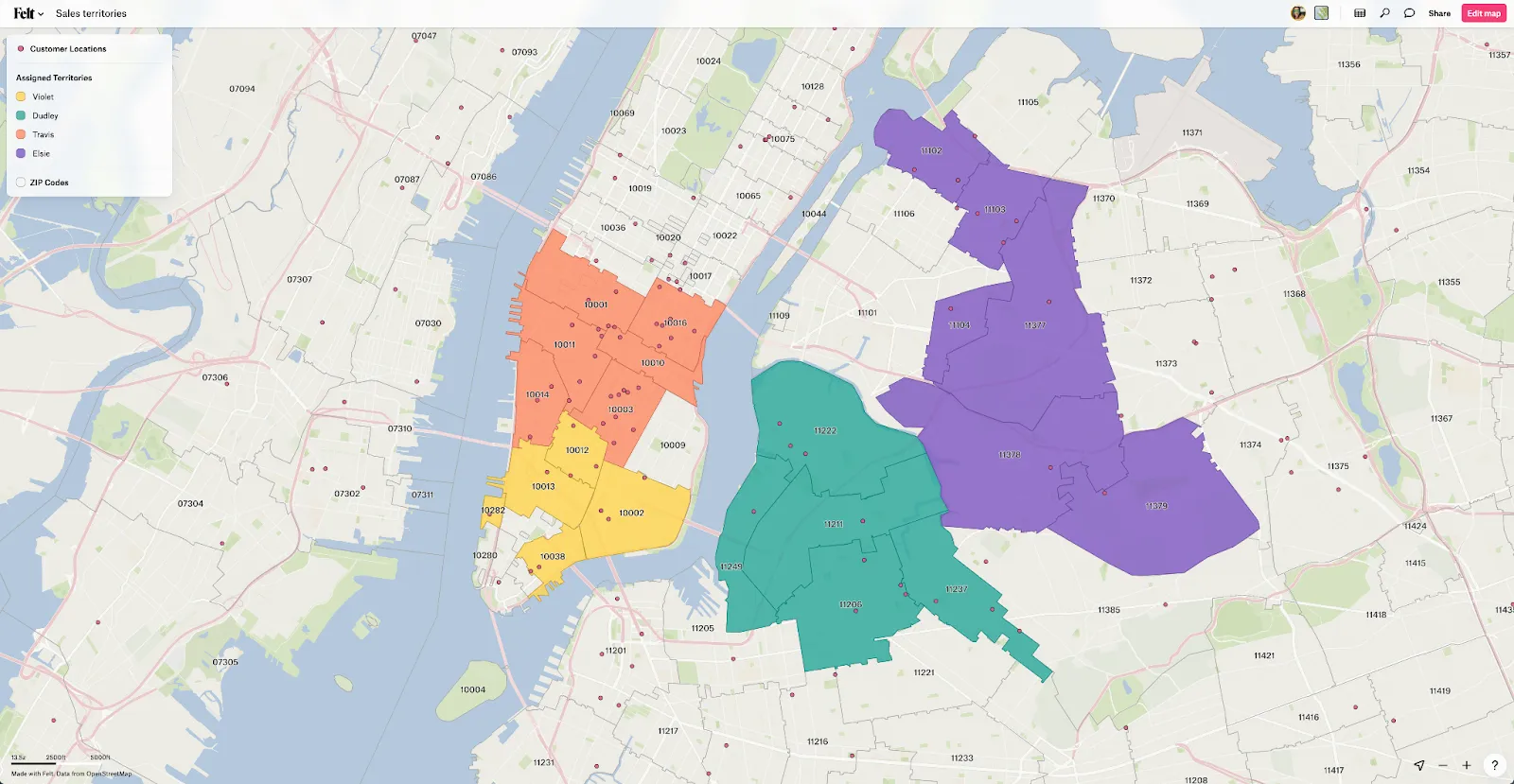
Sales territory mapping works best when you can turn scattered location data into a repeatable, operational model that delivers sales results. A strong mapping tool shows sales reps where to focus and how to cover each territory with fewer overlaps. It also gives managers a clear view of performance across regions so revenue trends are easier to explain.
Felt brings clarity to territory management with interactive mapping software that supports fast analysis. You can create custom maps that are easy to share and understand, then run GIS analyses to surface actionable insights. Real-time KPIs show graphs and charts that fit into any sales operations dashboard — and it all happens in real time.
Try Felt today and make sales simpler for your reps.
Compare Felt using AI




.webp)