Geospatial data formats: Vector, raster, and beyond
Learn common geospatial data formats, including raster and vector types used in GIS workflows.

Learn the most common geospatial data formats, including raster and vector types, and discover which fit your GIS workflows best.
Data sits at the center of every geographic information system (GIS) workflow. However, geospatial information takes many different forms. Vector files represent discrete features like roads, while raster types capture continuous imagery like the weather. There are also LiDAR types to measure elevation and spreadsheet files like Excel and CSV.
All of these formats have a place in different geospatial tasks, and understanding them lets you build simple, intuitive maps that tell a real story.
In this article, you’ll learn what GIS files are and how different geospatial data formats fit into your workflows.
What are geospatial data formats?
Geospatial data formats are structured file types that store location-based information. They organize metadata like geographic coordinates and attributes so GIS software can properly analyze and display it. The main categories are:
- Vector data stores features with clear shapes or boundaries. Vector formats represent things like roads and buildings as points, lines, or polygons.
- Raster data represents information as a grid of cells. Raster formats store data that changes across an area, like elevation or temperature.
- LiDAR data stores information as discrete points. LiDAR types typically represent 3D space, like elevation and building structure.
Tabular and database files are also common in geospatial workflows, but teams typically convert them into vector or raster data to create maps.
The right format depends on a team’s spatial data management. In other words, how they store, access, and use location information. For example, vector files often store larger amounts of data and offer broad software compatibility, but raster formats display gradual color gradients for more granular visuals.
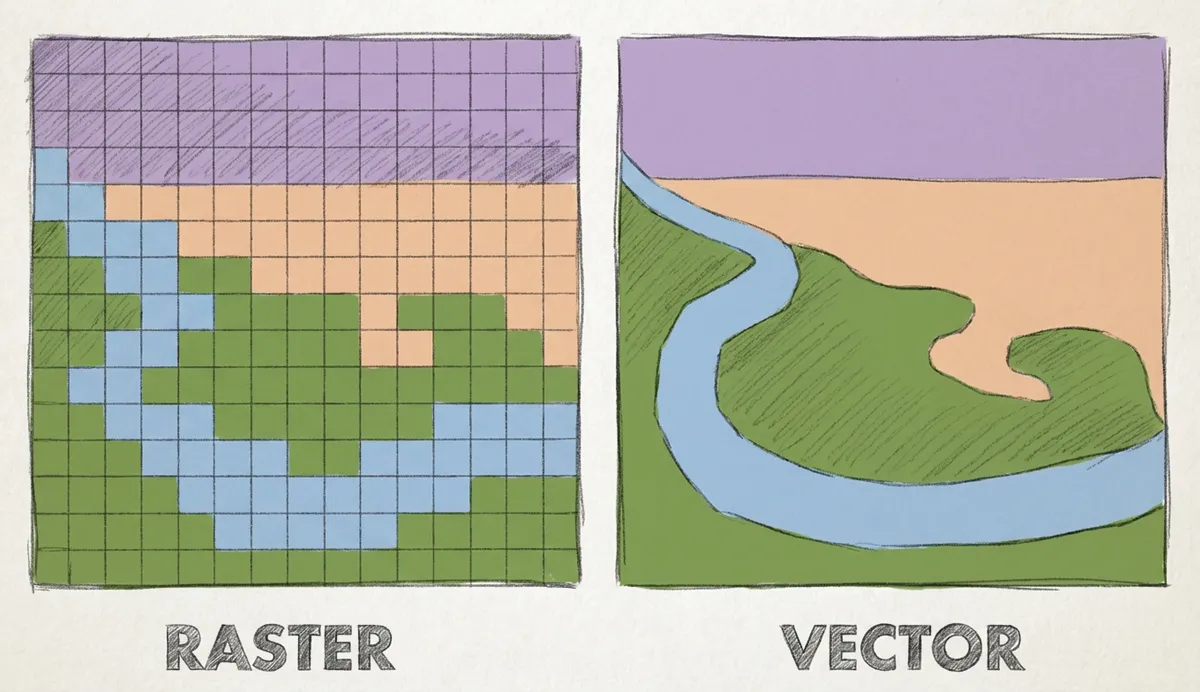
Types of geospatial data formats used in GIS
Here are various types of GIS file types that teams work with daily.
Vector data formats
Vector formats store location-based features that have a defined shape and location. You can use them when mapping clear geometry and attached attributes, like roads, utilities, and administrative boundaries. Here are some common vector data formats.
Shapefile
Shapefile (.shp) is one of the most widely recognized vector formats, and many GIS platforms read and write them. It stores location, shape, and attributes for point, line, or polygon data.
They’re inflexible by modern standards due to their limited size and geometry storage, though they still show up in many legacy datasets and cross-platform exchange workflows.
GeoJSON
GeoJSON gives vector data a lighter, text-based structure built on JavaScript Object Notation (JSON). This structure makes it easy to move geographic features into browser maps, web applications, and APIs. It works well for smaller datasets and fast exchanges, especially as it has understandable plain text to help with debugging and development.
GeoPackage
GeoPackage (.gpkg) provides a more modern vector format. It stores content in a single SQLite-based file that holds multiple layers together rather than spreading data across files, making sharing and project handoffs much easier.
This format follows a public Open Geospatial Consortium standard, so many GIS tools support it. GeoPackage’s open standard also means it can store raster tiles and metadata.
KML and KMZ
Keyhole Markup Language (KML) visualizes 3D globe-exploration style files — the same type Google Earth uses. Teams use it to share locations, paths, and overlays in a format that opens easily in visualization tools. Keyhole Markup Language Zipped (KMZ) is a related file type. KMZ wraps KML and its supporting assets into a zipped archive, making it easier to package and send as a single file.
Raster data formats
Raster formats model the world as a grid. You can use them when working with elements that change across space instead of following defined, clean boundaries. Here are popular raster data formats.
GeoTIFF
GeoTIFF (.tif) is one of the most common raster formats for gridded datasets. It stores georeferencing information inside a standard TIFF image file so GIS software can correctly read and place data. TIFF is lossless and extensible, preserving image quality without compromising geospatial metadata inside the file.
Cloud-Optimized GeoTIFF
A Cloud-Optimized GeoTIFF (COG) is a GeoTIFF for fast access over the web. It supports remote reading on HTTP file servers, letting applications request only the parts of a file they need instead of downloading the entire raster. COG organizes data in internal tiles and reduces resolution layers to speed up zooming and previews.
Esri Grid
Esri Grid is ArcGIS’ raster format. It stores raster data as equally sized square cells arranged in rows and columns. Teams use Esri Grid for in-depth surface analysis, though its names and paths have stricter naming rules than many new raster formats, reducing its flexibility.
NetCDF
NetCDF handles multidimensional scientific data. It works for datasets that span space and time, like climates, oceans, and atmospheric data. NetCDF represents axes like longitude and latitude, as well as time units like days and years.
MrSID and ECW
MrSID and ECW compress massive raster images. Both use wavelet compression to reduce file size but maintain depth and quality, allowing teams to zoom and pan across maps without performance issues. These formats are proprietary and common in older orthophoto libraries and imagery distribution workflows, though modern workflows tend to favor open formats like GeoTIFF and COG.
LiDAR and elevation data formats
LiDAR captures the Earth’s surface as millions of 3D points that branch into derived surfaces. It uses raw point cloud data to portray digital elevation models, slope layers, and hillshades. Let’s take a look at the main LiDAR file types.
LAS and LAZ
LAS and LAZ are the most common file formats for LiDAR point clouds. LAS is uncompressed, so point data is easy and fast to access. LAZ is the zipped version, reducing file size and making it easier to store and share, with little to no performance loss.
Raw LiDAR data can be massive and unstructured without the right processing tool. Instead of working with raw LAS or LAZ files, you can bring LiDAR-derived outputs into Felt to effortlessly visualize, style, and share them.
Tabular and database spatial formats
While many geospatial workflows begin with specific geospatial files, many teams start with spreadsheets and databases and use software to turn them into spatial data. Here are two common formats.
CSV or Excel with coordinates
Spreadsheet files can become spatial when rows include coordinates and addresses that GIS software can turn into map features. Platforms like Felt instantly transform Excel, CSV, and Google Sheets files into interactive maps. Simply upload a spreadsheet with locational data, and watch the system generate an in-depth, layered map.
Spatial databases
Spatial software like PostGIS stores geospatial information inside a database instead of a flat file. GIS tools like Felt connect to these databases directly, allowing teams to easily query and visualize the information on a map.
How to choose the right GIS format
Here are a few factors to consider when picking a geospatial file format:
- Type of data: Match the format to the data model. For instance, it’s best to choose vector formats for features with clear shapes and raster types for continuous surfaces.
- File size and performance: Be mindful of large rasters and point clouds that slow storage, transfer, and map loading speeds. Make sure you use these intensive types sparingly and opt for compressed files when possible to improve processing speeds.
- Sharing and interoperability needs: Choose widely compatible formats if you move data between teams or systems. Open standard files make transfer smoother between different software.
- Software compatibility: Check what your GIS, geodatabase, and web tools support before committing to a format. Even common or legacy formats can behave differently across platforms, especially when editing or styling maps.
Use any geospatial data format with Felt
Choosing the right geospatial format will help you create, share, and analyze data more efficiently. When you match formats to the task, you’ll move forward smoothly across projects, whether you’re building raster-based imagery analysis or vector-based choropleth maps.
Felt brings diverse spatial formats into one collaborative cloud workspace. It handles raster and vector data and supports imports from spreadsheets and cloud databases. Simply add your file, and watch as Felt transforms it into an interactive, layered map. It promotes deep, actionable analysis without requiring tech experience. Any team member can design maps, invite collaborators, and create spatial queries by chatting with AI.
Sign up for a free trial to see how Felt works with large spatial datasets.